World of Level Design™
Tutorials to Becoming the Best Level Designer and Game Environment Artist (since 2008)
"WoLD Insider" Newsletter Issue #12: Color Lighting Tip, Modeling as a Beginner, Maya Tutorials, 3D/Level Design Hobbies
Category: Newsletters
October, 2022

Welcome to "WoLD Insider" newsletter issue #12.
WoLD Insider Issue #12 contains - Dealing with Overwhelm as 3D Artist, Modeling as a Beginner, Better Lighting Tip, Best Hobbies for 3D/Level Design and more.
Every single "WoLD Insider" newsletter features level design and game environment art advice, tips, ideas, inspiration, links, resources and updates about World of Level Design. "WoLD Insider" is EXCLUSIVE to you as WoLD subscriber.
Following Issue #12 of "WoLD Insider" contains:
- Now Out: Maya Foundation - Home Study Course
- How to Overcome Feelings of Overwhelm, Stuck, Wanting to Quit
- 3 New Maya Modeling Tutorials
- Why You Need to Know Normal Map Formats (OpenGL vs DirectX)
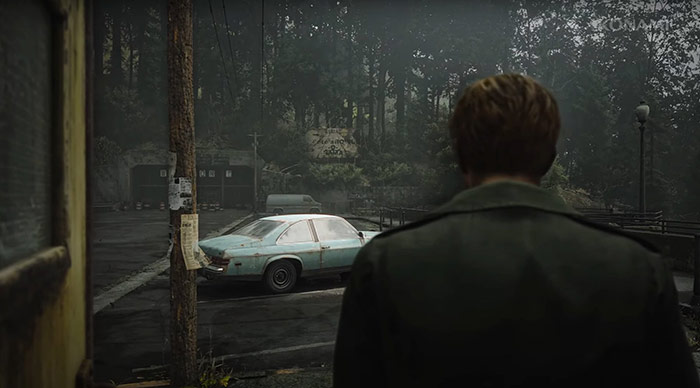
- Silent Hill 2 Remake Environment Inspiration
- Blocking Things Out from UE5 to Maya
- Get Your Scale Right First Then Model Away
- Download this Kitchen Set from Pixar to Learn USD
- UE5 Tip: Lower Texture Resolution Right Inside the Engine
- Lighting Tip: Use Complimentary Color Theory
- Which Hobbies are Best for 3D/Level Design?
Now Out - "Maya Foundation: Home-Study Course" Tutorials

Marketplace and stock assets will only take you so far until you see the same models being used by others. Your environments become a copy of a copy.
As environment artist you need to start learning modeling dcc package and create your own unique assets that no one can replicate. This is of course necessary if you are a freelancer or work as an artist in a studio.
I don't care if it's 3DSMax, Blender, Modo, Houdini or Maya. Pick one and master it.
If it's Maya then I've recently released a home-study course available to download right now.
It is the Complete Beginner's Guide to Learning Maya Modeling and UVing:
- No prior 3d experience/modeling knowledge required
- Learn Maya modeling and UVing as a complete beginner
- Save thousands of dollars from attending college classes
- Save months of wasted time watching irrelevant YouTube tutorials
- 65+ videos
- 18+ hours
Download the course now and start creating unique assets...
4 New Maya Tutorials
4 brand new, extensive tutorials have been released to help you get started with Maya as a complete beginner.
Ways to Download and Get Maya (For Indie Devs, Freelancers, Hobbyists and Students)

As a Maya user, there are 4 ways to download and use Maya. One of these is an Indie version that most are not familiar with but it is a full version of Maya at an affordable price.
See this full breakdown what the 4 ways are and how to get the Indie version...
18 Crucial Mistakes Beginners Make Using Maya - How to Fix Them and Avoid Them

As a beginner you will make a lot of mistakes and not know how to fix them. One of the most frustrating things about learning Maya is accidently pressing a shortcut key then not knowing how to disable it.
Secrets to Getting Started with Maya as Complete Beginner 3D Artist

If you are completely new to Maya and have no clue where to start, this post will tell you.
Here are the secrets to learning Maya every beginner needs to know...
Focus On These 11 Modeling Tools to Get Started with Maya for Beginners

You only need to know 11 modeling tools to get started modeling in Maya. With these you'll be able to model most of environments and props.
Focus on mastering these 11 modeling tools to create most of environments...
Overcome Feeling Overwhelmed, Stuck and Wanting to Quit 3D Art

You will constantly be asking yourself "Is this really for me? Will I ever learn this? Will I ever be good enough to create the work I see others create?"
The path for 3d artist is paved with experiencing the highest highs and the lowest lows. More projects will be incomplete than the ones you do complete.
So, how do you get over the feeling of overwhelm and frustration when learning and becoming a 3d artist?
Substance Painter Normal Map Formats
There are 2 types of Normal Map Formats you'll be dealing with depending on output: DirectX and OpenGL.

These are defined in preset of Substance Painter but it's something you should know:
- UE4/5, 3DSMax = DirectX
- Maya, Unity, Blender = OpenGL
DirectX requires a Flipped Green Channel.
Silent Hill 2 Remake Environment Inspiration
Silent Hill 2 Remake was recently announced and a teaser was released. Here are some screenshots to inspire. Great atmospheric environment shots. Amazing use of lighting, overcast sky, fog and desaturated colors.



Blocking Things Out
Use UE5 modeling tools to blockout meshes then export to your dcc package for rest of the modeling. Using the new tools does take a little longer than it would have using BSP brushes but results were same:
- Blocked out house in Maya used as modeling template
- Brought it into Maya to model
- Import back to UE5


Someone asked me: "Did you work off that same model or did you have to remake it to fix topology?"
I remake it with new primitive shapes. I place the imported mesh into a Visibility Layer to use it as a template. Then lock it and use it as a guide to start with new primitives.
Get Your Scale Right First Then Model Away
Get your props into the game engine as soon as possible. Even if they are primitive shapes. Test the size, dimensions, proportions. Get that scale right. Iteration is easy after.

Important tip when dealing with game engines, especially with Unreal Engine. Start w/simple blockouts and real-world dimensions then increase prop scale slightly by few cm to make them look bulkier.
I found exact real-world dimensions make props look smaller when using FPS or 3rd Person Templates.
I also recommend to spawn in-game and playtest right away. Once that's done and you are satisfied with the size, start modeling.
USDK Kitchen Set from Pixar
If you are learning USD workflow, pick up the free Kitchen Set from Pixar and load it inside your 3d modeling software or even UE5.
Here it is in Maya and in UE5.


Visit this page to download the USD Kitchen Set from Pixar.
If you don't know. USD is Universal Scene Description, a file format developed by Pixar that has become open source. USD stores scene information from many smaller USD files that can be read by other software. It is a great way to work on complex scenes with multiple people and to build/modify environments in a non-destructive manner.
Here are few important resources:
UE5 Tip on Lowering Texture Resolution In-Engine
You can quickly lower texture resolution right inside Unreal Engine without having to resize/reimport.
- Open texture in Texture Editor in UE5
- Note current Imported/Displayed/Max In-Game and Resource Size of texture
- Go to Compression, under Maximum Texture Size change to pixel amount you want
- Save and done

Note: this will reduce your texture memory at run-time and when you package the game. But not storage on disk in editor. As you can always revert back to default texture resolution at any time.
Lighting Tip
Use complimentary color lighting. Take 2 colors opposite on color wheel. Use one as your dominant color then introduce another color, opposite side of color wheel.


Both of these colors should NOT be 50/50. One should be more dominant than other.
Works every time!
Which Hobbies are Best for 3D Environment Design and Level Design
Best art hobbies that will directly benefit 3d environment art and level design are drawing, painting, photography, cinematography.
Also pick up study of architecture and interior design.
You don't need to master these but introducing one of these or more when not actively working on 3d/level design will greatly benefit your development as a 3d artist.
Hope you enjoyed this newsletter issue and check out some previous issues for more tips, links, advice and techniques.

SUBSCRIBE & GET FREE UE5 PDF GUIDE
Subscribe to receive NEW/UPDATED and FREE "UE5 Beginner's Quick Start Guide" PDF (90 pages).

Visit this page for more info about the guide...
TOP 7 TUTORIAL COURSES FOR 2026
 Modular Environment Design Masterclass Tutorial Course
 Maya Foundation: Home-Study Course - Model and UV Environments
 Substance 3D Painter Essentials - Master Texturing
 UE5: Fundamentals Vol.1 - Create with Unreal Engine 5
 UE5: Retro Office Project - Create Beautiful Interior Env
 UE5: Master Material Creation - Create Master Materials in UE5
 Preproduction Blueprint: Plan Environments and Level Designs
TUTORIAL CATEGORIES
MODULAR ENVIRONMENTS MASTERCLASS

UE5: RETRO OFFICE PROJECT

MAYA FOUNDATION COURSE

SUBSTANCE PAINTER ESSENTIALS

LEARN THE PREPRODUCTION PROCESS

ABOUT WoLD & ALEXG

My name is AlexG. I am self-taught level designer, game environment artist and the creator of World of Level Design.com. I've learned everything I know from personal experimentation and decades of being around various online communities of fellow environment artist and level designers. On World of Level Design you will find tutorials to make you become the best level designer and game environment artist.
Home Terms of Use/Trademarks/Disclaimers Privacy Policy Donate About Contact
All content on this website is copyrighted ©2008-2024 World of Level Design LLC. All rights reserved.
Duplication and distribution is illegal and strictly prohibited.
World of Level Design LLC is an independent company. World of Level Design website, its tutorials and products are not endorsed, sponsored or approved by any mentioned companies on this website in any way. All content is based on my own personal experimentation, experience and opinion. World of Level Design™ and 11 Day Level Design™ are trademarks of AlexG.
Template powered by w3.css