World of Level Design™
Tutorials to Becoming the Best Level Designer and Game Environment Artist (since 2008)
"WoLD Insider" Newsletter Issue #09: UE5 Release, Complete Game Prop Creation Series, Liminal Spaces and UE4/Maya Tips
Category: Newsletters
April, 2022
Welcome to "WoLD Insider" newsletter issue #9.
Every single "WoLD Insider" newsletter features level design and game environment art advice, tips, ideas, inspiration, links, resources and updates about World of Level Design. "WoLD Insider" is EXCLUSIVE to you as WoLD subscriber.
Following Issue #9 of "WoLD Insider" contains:
- UE5 is Finally Out
- Complete Game Prop Creation - Wooden Barrel (UE4, Maya, Substance)
- What Are Liminal Spaces and Examples
- UE4 Quick Tip #21: Can’t See My Light Attenuation Radius
- UE4 Speed Up Working with BSP Brushes
- UE4: Export/Import & Use Mannequin for Scale Reference in Maya or Other 3D Software
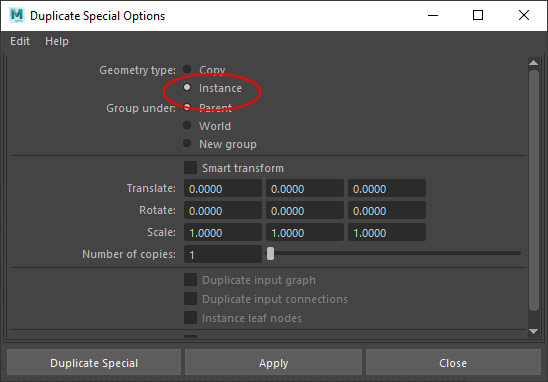
- Maya Tip: 2 Ways to Speed Up Repeated Modeling by UVing First Then Duplicate or Using Instances
UE5 is Finally Out
Unreal Engine 5 is finally out of preview and in production release. You can download it now through Epic Games Launcher. Time to level up!
Complete Game Prop Creation - Wooden Barrel (UE4, Maya, Substance)

Number ONE game prop you should model as a beginner is a wooden crate.
Number TWO game prop you should model is a wooden barrel.
In this 4-part tutorial series you will get access to the complete process pipeline from beginning to end from modeling, UVing, texturing and exporting/importing a game ready asset into UE4.
Software used:
- Maya
- Substance Painter
- UE4 (will work in UE5)
Tutorial Series is 4-Parts:
- Modeling with Maya
- UVing with Maya
- Texturing with Substance Painter
- Exporting from Maya and Importing into UE4
FULL SERIES with Videos and Detailed Notes are here...
What Are Liminal Spaces and Examples
Liminal Spaces: means threshold. Space in the environment that leads to something new, something bigger and to a landmark. It is the space in-between.
"Being in a liminal space can be incredibly uncomfortable for most people."
Some examples:
- Corridors
- Hallways
- Staircases
- Tunnels
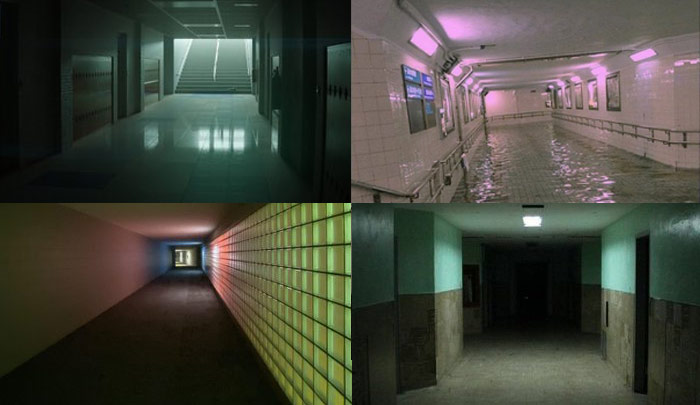
There is even a SubReddit for Liminal Spaces.
UE4 Quick Tip #21: Can’t See My Light Attenuation Radius
Somehow turned off Light Attenuation Radius in UE4.
- Shortcut Alt+R to turn it back on.
- Make sure you are not in Game View (G).
- You can also go to Show > Advanced > Light Radius
UE4 Speed Up Working with BSP Brushes
If you work a lot with UE4 BSP brushes and brush editing mode then you have to set up your own shortcut for saving pivot points on brushes.
Instead of Right-Clicking on the brush and choosing Pivot > Set as Pivot Offset. Go to Editor Preferences: Keyboard Shortcuts and search for pivot offset. Then enter a shortcut. Mine is Shift+P.
UE4: How to Export/Import & Use Mannequin for Scale Reference in Maya or Other 3D Software
How to get UE4 Mannequin model into Maya or any other 3d software by exporting and import. I use this for reference scale to judge dimensions, scale and proportions of my environments and assets better.
Maya Tip: 2 Ways to Speed Up Repeated Modeling by UVing First Then Duplicate or Using Instances
Two ways you can speed up your modeling in Maya by using these two tips within your modeling process.
One is modeling a piece of geometry that will be repeated then UVing before duplicating. This way you only have to UV once piece of geometry and UVs will be already done.
Two is to use Instances. Sometimes you may not want to UV as you model. So instead use Instances duplicate by going to Edit > Duplicate Special and changing to Instance copies. This way you can UV one copy and it will propagate for every repeated instance copy of the mesh.
Hope you enjoyed this newsletter issue and check out some previous issues for more tips, links, advice and techniques.

SUBSCRIBE & GET FREE UE5 PDF GUIDE
Subscribe to receive NEW/UPDATED and FREE "UE5 Beginner's Quick Start Guide" PDF (90 pages).

Visit this page for more info about the guide...
TOP 7 TUTORIAL COURSES FOR 2026
 Modular Environment Design Masterclass Tutorial Course
 Maya Foundation: Home-Study Course - Model and UV Environments
 Substance 3D Painter Essentials - Master Texturing
 UE5: Fundamentals Vol.1 - Create with Unreal Engine 5
 UE5: Retro Office Project - Create Beautiful Interior Env
 UE5: Master Material Creation - Create Master Materials in UE5
 Preproduction Blueprint: Plan Environments and Level Designs
TUTORIAL CATEGORIES
MODULAR ENVIRONMENTS MASTERCLASS

UE5: RETRO OFFICE PROJECT

MAYA FOUNDATION COURSE

SUBSTANCE PAINTER ESSENTIALS

LEARN THE PREPRODUCTION PROCESS

ABOUT WoLD & ALEXG

My name is AlexG. I am self-taught level designer, game environment artist and the creator of World of Level Design.com. I've learned everything I know from personal experimentation and decades of being around various online communities of fellow environment artist and level designers. On World of Level Design you will find tutorials to make you become the best level designer and game environment artist.
Home Terms of Use/Trademarks/Disclaimers Privacy Policy Donate About Contact
All content on this website is copyrighted ©2008-2024 World of Level Design LLC. All rights reserved.
Duplication and distribution is illegal and strictly prohibited.
World of Level Design LLC is an independent company. World of Level Design website, its tutorials and products are not endorsed, sponsored or approved by any mentioned companies on this website in any way. All content is based on my own personal experimentation, experience and opinion. World of Level Design™ and 11 Day Level Design™ are trademarks of AlexG.
Template powered by w3.css