World of Level Design™
Tutorials to Becoming the Best Level Designer and Game Environment Artist (since 2008)
"WoLD Insider" Newsletter Issue #08: Modeling Iterations Tip, Workshop Video, Visual Inspiration and Environment Idea
Category: Newsletters
March, 2022
Welcome to "WoLD Insider" newsletter issue #8.
Every single "WoLD Insider" newsletter features level design and game environment art advice, tips, ideas, inspiration, links, resources and updates about World of Level Design. "WoLD Insider" is EXCLUSIVE to you as WoLD subscriber.
Following Issue #8 of "WoLD Insider" contains:
- Modeling Approach Tip for Faster Iterations and Experimentation
- Full Workshop with Almost 2hrs of Techniques, Tips and Workflows
- How to Draw Top-Down Level Design Map Layouts
- Environment/Level Design Idea
- Software for Generating Normal Maps from Images
- 11 Social Media Accounts for Visual Inspiration and Ideas
Modeling Approach Tip for Faster Iterations and Experimentation
Create modeling "graveyards". These are duplicated assets that you move off to the side in the same scene as you model. This allows you to quickly test, experiment and not be afraid of committing because you'll always have a copy to come back to anytime.
Of course still save different version of the scene but I've found having modeling graveyards is a faster way to work.
The key is to always duplicate the asset right before you are about to do something to it, then Freeze Transformations, move it off to the side and do whatever you want to the copy.
If it doesn't work, then bring back the duplicate version and try again.
Watch it on YouTube: www.youtube.com/watch?v=x7Z4NTReS50
Full Workshop with Almost 2hrs of Techniques, Tips and Workflows
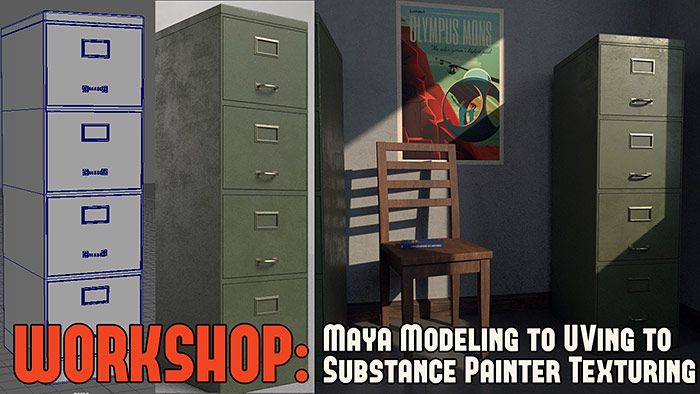
The idea came from wanting to do a simple prop so I can texture it in Substance Painter to learn the software.
Didn't want to use any previous models I've created. Decided to create a new one and went with a simple prop - a file cabinet.
I also didn't want to stop there but use the prop to create, light and render a small scene with it.
I created a full workshop for you to see the modeling, UVing process in Maya. Then texturing process in Substance Painter. I also added a small bonus section of the final, small scene I put together to light and render with.
Check out the full workshop with almost 2 hours of techniques, tips and workflows...
3 Workflow Techniques - How to Draw Top-Down Level Design Map Layouts
Few years ago I published this tutorial that explains how to draw top-down layouts. It is one of those tutorials that are relevant no matter when you watch it.
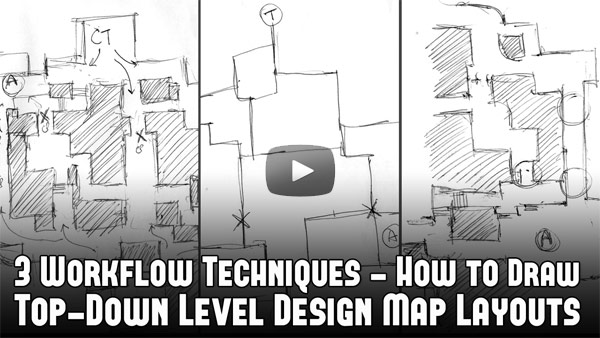
Top-down layout is a schematic design or a floor plan of your map. Best and most practical way of creating top-down layouts is pen and paper.
Hand drawing layouts are not complicated. You do not need to know how to draw. All that's required is ability to visualize how your level is going to play. You have to plan out map's playable paths, alternative routes, connecting routes, choke points, objectives, obstacles and boundaries of the world.
Check out 3 Workflow Techniques - How to Draw Top-Down Level Design Map Layouts...
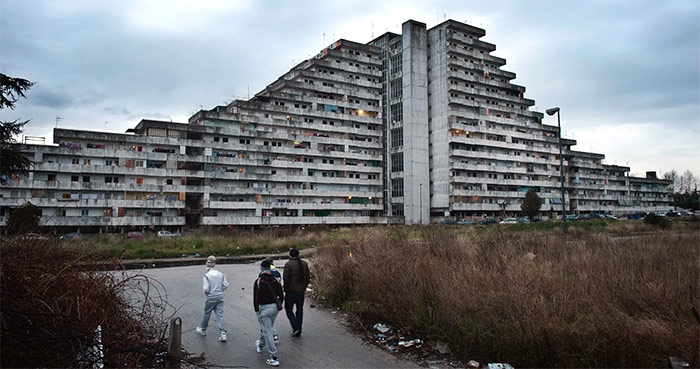
Environment/Level Design Idea: Scampia, Naples
Interesting architecture for environment art or level design. I originally saw this in Gomorrah tv show. These are housing projects in Scampia, Naples.
Quick Go To Software for Generating Normal Maps from Images
I asked a question on Twitter:
"What do most use currently for QUICK go to software for generating Normal Maps from Images (color/black & white images)?"
Few years ago there was CrazyBump, xNormals, Knald and Quixel Suite.
But I wanted to know what do others use now days?
Here are some replies:
- Photoshop Nvidia Plugin: works with Photoshop CC and there is an older legacy version for CS developer.nvidia.com/nvidia-texture-tools-exporter
- NJob: stand-alone Normal Map generator charles.hollemeersch.net/njob/
- Knald: older normal map generator. Still used but hasn't received updates I a while.
- Crazybump: old school normal map generator; also still used but like Knald hasn't received updates in a while.
What do you use? You can reply to this Tweet and let me know.
11 Social Media Accounts for Visual Inspiration and Ideas
Here are some good accounts I follow for daily dose of 3d, concept art, photography, architecture, visuals for ideas, inspiration and motivation.
- Twitter.com/FedeItaliano76 - lots of visual aesthetics (painting, photo, architecture, art)
- Twitter.com/80Level - 3d and game art related content
- Twitter.com/Substance3D - substance design/painter art work
- Twitter.com/archillect - visual aesthetics
- Twitter.com/AcademiaAesthe1 - visual aesthetics
- Twitter.com/SpaceLiminalBot - architectural spaces in-between
- Twitter.com/archisound - lot of architecture
- Twitter.com/archpng - more architecture
- Twitter.com/BeyondExtent - game environment art
- Twitter.com/game_obscure - obscure game aesthetics
- Twitter.com/VideoArtGame - art of videogames
Hope you enjoyed this newsletter issue and check out some previous issues for more tips, links, advice and techniques.

SUBSCRIBE & GET FREE UE5 PDF GUIDE
Subscribe to receive NEW/UPDATED and FREE "UE5 Beginner's Quick Start Guide" PDF (90 pages).

Visit this page for more info about the guide...
TOP 7 TUTORIAL COURSES FOR 2026
 Modular Environment Design Masterclass Tutorial Course
 Maya Foundation: Home-Study Course - Model and UV Environments
 Substance 3D Painter Essentials - Master Texturing
 UE5: Fundamentals Vol.1 - Create with Unreal Engine 5
 UE5: Retro Office Project - Create Beautiful Interior Env
 UE5: Master Material Creation - Create Master Materials in UE5
 Preproduction Blueprint: Plan Environments and Level Designs
TUTORIAL CATEGORIES
MODULAR ENVIRONMENTS MASTERCLASS

UE5: RETRO OFFICE PROJECT

MAYA FOUNDATION COURSE

SUBSTANCE PAINTER ESSENTIALS

LEARN THE PREPRODUCTION PROCESS

ABOUT WoLD & ALEXG

My name is AlexG. I am self-taught level designer, game environment artist and the creator of World of Level Design.com. I've learned everything I know from personal experimentation and decades of being around various online communities of fellow environment artist and level designers. On World of Level Design you will find tutorials to make you become the best level designer and game environment artist.
Home Terms of Use/Trademarks/Disclaimers Privacy Policy Donate About Contact
All content on this website is copyrighted ©2008-2024 World of Level Design LLC. All rights reserved.
Duplication and distribution is illegal and strictly prohibited.
World of Level Design LLC is an independent company. World of Level Design website, its tutorials and products are not endorsed, sponsored or approved by any mentioned companies on this website in any way. All content is based on my own personal experimentation, experience and opinion. World of Level Design™ and 11 Day Level Design™ are trademarks of AlexG.
Template powered by w3.css