World of Level Design™
Tutorials to Becoming the Best Level Designer and Game Environment Artist (since 2008)
"WoLD Insider" Newsletter Issue #07: Tip for Modeling Dimensions, Photo Reference and Flipped UVs
Category: Newsletters
February, 2022
Welcome to "WoLD Insider" newsletter issue #7.
Every single "WoLD Insider" newsletter features level design and game environment art advice, tips, ideas, inspiration, links, resources and updates about World of Level Design. "WoLD Insider" is EXCLUSIVE to you as WoLD subscriber.
Following Issue #7 of "WoLD Insider" contains:
- New In-Depth Beginner Series Using Redshift Render with Maya
- Modeling Tip on How to Find World Dimensions of Props/Objects
- On Taking Reference Photos to Become Better
- Maya Flipped UVs Tip
- Substance Painter Tip #1 on HDR Images and Comparing Texture Results
- Software I've Been Learning and Using
Extensive Series: Complete Beginner's Guide to Using Redshift with Maya

I recently released a huge in-depth tutorial series on how to get started with Redshift render using Maya. This series isn't for everyone because many of you don't use Maya and if you do use Maya you may not use Redshift renderer. But if you do then I have a treat for you with this 2+hour tutorial series entirely FREE. I've been using Redshift for about a year and I really like it. I like the speed of the renderer and ease of use.
Check out the full "Complete Beginner's Guide to Using Redshift with Maya"...
Modeling Tip: How to Find Object/Prop Dimensions That You Can Start Modeling With
Finding correct scale dimensions for props and objects can be difficult. Sometimes a web search doesn't produce good results. But I've got a great tip for finding object/prop dimensions that you can start modeling with and what to do next.
Watch it on YouTube: www.youtube.com/watch?v=fx4FVTHsekg
Substance Painter Tip #1: Use Same HDRI from Painter w/Other Software to Compare Texture Result
Being able to compare the texturing work I'm doing in Painter and how it will look in another render is important. I want to know that the results are the same. So here is a way to get the same HDR image from Painter into Maya (or other software) to see how your textures measure up.
Watch it on YouTube: www.youtube.com/watch?v=FLaRB53JLQY
On Taking Photo Reference to Become Better

Taking environment design art reference shots develops your artistic eye. Makes you pay attention, become present and builds ideas. Even if you never actually use any of them for your work. Take more reference shots.
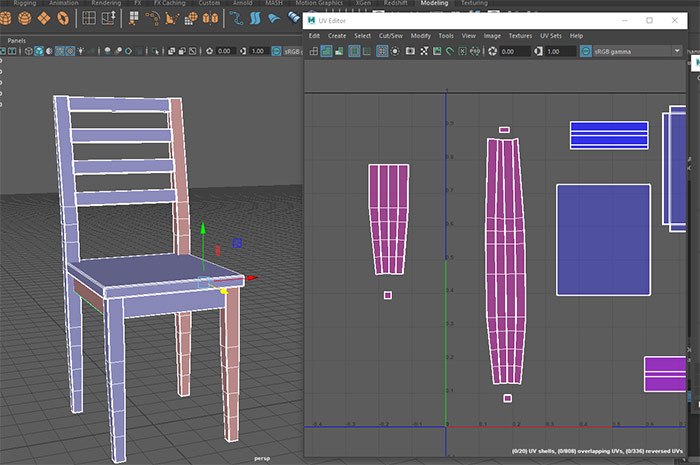
Maya Tip: Mirrored Geometry and Flipped UVs
In Maya the UVs will be flipped on any Mirrored geometry.
Select the flipped UV shells and go to Modify > Flip to reverse them.
In Maya's UV Editor enable View>Shaded (5).
- Red=inside out, need to be flipped
- Blue=correct
Software I've Been Learning and Using
Since my deep dive into Redshift Render for Maya, I've also picked up other software I had to use for work. These include ZBrush and Substance Painter.
Tutorials will be coming out for both.
As well as more in-depth and advanced Maya modeling techniques for environment art.
It seems to me Maya LT will no longer be around. It hasn't received any updates since 2020. There is an Indie version of Maya that offers full Maya features at the price point of Maya LT. I don't know if Autodesk will continue Maya LT but based on latest updates, it doesn't look good.
Onto Maya Indie it is.
Hope you enjoyed this newsletter issue and check out some previous issues for more tips, links, advice and techniques.

SUBSCRIBE & GET FREE UE5 PDF GUIDE
Subscribe to receive NEW/UPDATED and FREE "UE5 Beginner's Quick Start Guide" PDF (90 pages).

Visit this page for more info about the guide...
TOP 7 TUTORIAL COURSES FOR 2026
 Modular Environment Design Masterclass Tutorial Course
 Maya Foundation: Home-Study Course - Model and UV Environments
 Substance 3D Painter Essentials - Master Texturing
 UE5: Fundamentals Vol.1 - Create with Unreal Engine 5
 UE5: Retro Office Project - Create Beautiful Interior Env
 UE5: Master Material Creation - Create Master Materials in UE5
 Preproduction Blueprint: Plan Environments and Level Designs
TUTORIAL CATEGORIES
MODULAR ENVIRONMENTS MASTERCLASS

UE5: RETRO OFFICE PROJECT

MAYA FOUNDATION COURSE

SUBSTANCE PAINTER ESSENTIALS

LEARN THE PREPRODUCTION PROCESS

ABOUT WoLD & ALEXG

My name is AlexG. I am self-taught level designer, game environment artist and the creator of World of Level Design.com. I've learned everything I know from personal experimentation and decades of being around various online communities of fellow environment artist and level designers. On World of Level Design you will find tutorials to make you become the best level designer and game environment artist.
Home Terms of Use/Trademarks/Disclaimers Privacy Policy Donate About Contact
All content on this website is copyrighted ©2008-2024 World of Level Design LLC. All rights reserved.
Duplication and distribution is illegal and strictly prohibited.
World of Level Design LLC is an independent company. World of Level Design website, its tutorials and products are not endorsed, sponsored or approved by any mentioned companies on this website in any way. All content is based on my own personal experimentation, experience and opinion. World of Level Design™ and 11 Day Level Design™ are trademarks of AlexG.
Template powered by w3.css