World of Level Design™
Tutorials to Becoming the Best Level Designer and Game Environment Artist (since 2008)

BSP Brushes in Unreal Engine were ONE OF THE BEST ways to block out environments.
BSP offered:
- Quick workflow
- Fast iterations
- All you needed was an idea
- And basic lighting map setup
But UE5 blockout methods have changed to favor:
- UE5's Modeling Mode
- Creating and using Base Static Meshes
- Blocking out entirely in 3d modeling application then exporting into UE5
Blocking out with BSP in UE5 has almost disappeared as they have been deprecated and no longer supported in UE5.
But luckily BSP brushes are still available in UE5.7 if you want to continue using them.
If you go under More > Geometry, you'll get access to the BSP brush menu. You would then simply drag BSP shapes from menu right into the level and use Details Panel or Brush Editing Mode (Shift+7) to modify the brushes.


Check out this short video on YouTube I did for more details.
If you decide to use it, you'll have to deal with some problems that BSP tends to have such as gizmo transformation issues, geometry issues of missing faces, lighting issues and horrible pivot point controls.
Despite all that, BSP still offers a quick and super-fast geometry iterations right inside the engine.
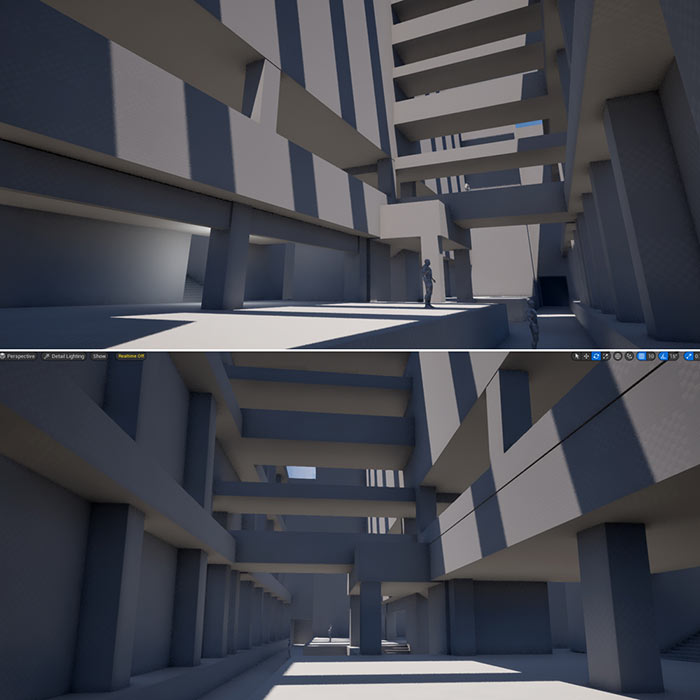
Here is an early and rough BSP environment blockout in UE5 I recently did to prototype a sense of space and layout.
As mentioned, there are other blockout methods you could use such as:
- Dynamic Meshes in UE5's Modeling Mode
- Static Meshes in UE5's Modeling Mode
- Cube Grid in UE5's Modeling Mode
- Base Modular Static Meshes created in 3d modeling application
- Blocking out entirely in 3d modeling application
All will have their pros and cons you'll have to work around.
But I use them all.
In the end, all are means to an end to get your environment idea tested and prototyped.
For breakdown of each method check out this tutorial I've put together: UE5: 3 Methods for Blocking Out Environments and Level Designs.
In addition, I've been building more environments using a Base Modular Static Mesh kit.

Using the Base Mesh Kit as the starting point for blockouts then these same meshes eventually become final, detailed, textured geometry in the level.
This has been a great way to create environments and also build modular assets from scratch.
Make sure to get the complete ultimate guide to creating modular environment assets from start to finish tutorial course: Modular Environment Design Masterclass.

Talk soon.
Keep on creating!

SUBSCRIBE & GET FREE UE5 PDF GUIDE
Subscribe to receive NEW/UPDATED and FREE "UE5 Beginner's Quick Start Guide" PDF (90 pages).

Visit this page for more info about the guide...
TOP 7 TUTORIAL COURSES FOR 2026
 Modular Environment Design Masterclass Tutorial Course
 Maya Foundation: Home-Study Course - Model and UV Environments
 Substance 3D Painter Essentials - Master Texturing
 UE5: Fundamentals Vol.1 - Create with Unreal Engine 5
 UE5: Retro Office Project - Create Beautiful Interior Env
 UE5: Master Material Creation - Create Master Materials in UE5
 Preproduction Blueprint: Plan Environments and Level Designs
TUTORIAL CATEGORIES
MODULAR ENVIRONMENTS MASTERCLASS

UE5: RETRO OFFICE PROJECT

MAYA FOUNDATION COURSE

SUBSTANCE PAINTER ESSENTIALS

LEARN THE PREPRODUCTION PROCESS

ABOUT WoLD & ALEXG

My name is AlexG. I am self-taught level designer, game environment artist and the creator of World of Level Design.com. I've learned everything I know from personal experimentation and decades of being around various online communities of fellow environment artist and level designers. On World of Level Design you will find tutorials to make you become the best level designer and game environment artist.
Home Terms of Use/Trademarks/Disclaimers Privacy Policy Donate About Contact
All content on this website is copyrighted ©2008-2024 World of Level Design LLC. All rights reserved.
Duplication and distribution is illegal and strictly prohibited.
World of Level Design LLC is an independent company. World of Level Design website, its tutorials and products are not endorsed, sponsored or approved by any mentioned companies on this website in any way. All content is based on my own personal experimentation, experience and opinion. World of Level Design™ and 11 Day Level Design™ are trademarks of AlexG.
Template powered by w3.css